> ## Documentation Index
> Fetch the complete documentation index at: https://docs.repacket.com/llms.txt
> Use this file to discover all available pages before exploring further.
# Categories
> A list of Repacket's default categories.
To simplify configuration, domains are grouped into categories. Categories contain lists of domains or wildcard domains (i.e. `*.google.com`). A website may belong to more than one category.
## Overview
To simplify configuration, domains are grouped into categories.
Categories contain lists of domains or wildcard domains (i.e. `*.google.com`).
A website may belong to more than one category.
Repacket ships with over 80 pre-defined categories to help you get started quickly.
Includes movie, TV, and entertainment websites.
Video streaming services and platforms.
Music streaming and download services.
News outlets, magazines, and media sites.
Sites for finding and viewing images and videos.
Social media platforms and community sites.
Dating websites and relationship services.
Individual websites, blogs, and personal journals.
E-card and digital greeting services.
Messaging platforms and communication tools.
Browser-based email services and webmail.
Banking, investment, and financial management sites.
Corporate websites and business services.
Online auction and bidding websites.
E-commerce and retail websites.
Employment websites and career resources.
Security tools, antivirus, and protection services.
Tech news, guides, and computing resources.
Free and trial software download sites.
Often used for file sharing.
Web search and discovery tools.
Hosting providers and server management services.
Research databases and reference materials.
Schools, universities, and learning platforms.
Child-friendly websites and educational content.
Scientific resources and technology publications.
Medical information and healthcare resources.
Below is the complete list of all built-in categories with their IDs. You can reference these IDs when using the API or in configuration files.
```
0. Uncategorized
1. Real Estate
2. Computer and Internet Security
3. Financial Services
4. Business and Economy
5. Computer and Internet Info
6. Auctions
7. Shopping
8. Cult and Occult
9. Travel
10. Abused Drugs
11. Adult and Pornography
12. Home and Garden
13. Military
14. Social Networking
15. Dead Sites
16. Individual Stock Advice and Tools
17. Training and Tools
18. Dating
19. Sex Education
20. Religion
21. Entertainment and Arts
22. Personal sites and Blogs
23. Legal
24. Local Information
25. Streaming Media
26. Job Search
27. Gambling
28. Translation
29. Reference and Research
30. Shareware and Freeware
31. Peer to Peer
32. Marijuana
33. Hacking
34. Games
35. Philosophy and Political Advocacy
36. Weapons
37. Pay to Surf
38. Hunting and Fishing
39. Society
40. Educational Institutions
41. Online Greeting Cards
42. Sports
43. Swimsuits and Intimate Apparel
44. Questionable
45. Kids
46. Hate and Racism
47. Personal Storage
48. Violence
49. Keyloggers and Monitoring
50. Search Engines
51. Internet Portals
52. Web Advertisements
53. Cheating
54. Gross
55. Web-based Email
56. Malware Sites
57. Phishing and Other Frauds
58. Proxy Avoidance and Anonymizers
59. Spyware and Adware
60. Music
61. Government
62. Nudity
63. News and Media
64. Illegal
65. Content Delivery Networks
66. Internet Communications
67. Bot Nets
69. Health and Medicine
70. Confirmed SPAM Sources
71. SPAM URLs
72. Unconfirmed SPAM Sources
73. Open HTTP Proxies
74. Dynamically Generated Content
75. Parked Domains
76. Alcohol and Tobacco
77. Private IP Addresses
78. Image and Video Search
79. Fashion and Beauty
80. Recreation and Hobbies
81. Motor Vehicles
82. Web Hosting
83. Food and Dining
85. Self Harm
87. Low-THC Cannabis Products
```
Custom categories allow you to define your own domain groups to use in security and policy rules. This makes it easy to group internal domains and apply consistent rules.
### Creating Custom Categories
You can create custom categories by visiting the [Entities](https://app.repacket.com/entities) page on your dashboard.
Below is an example of how to create a custom category.
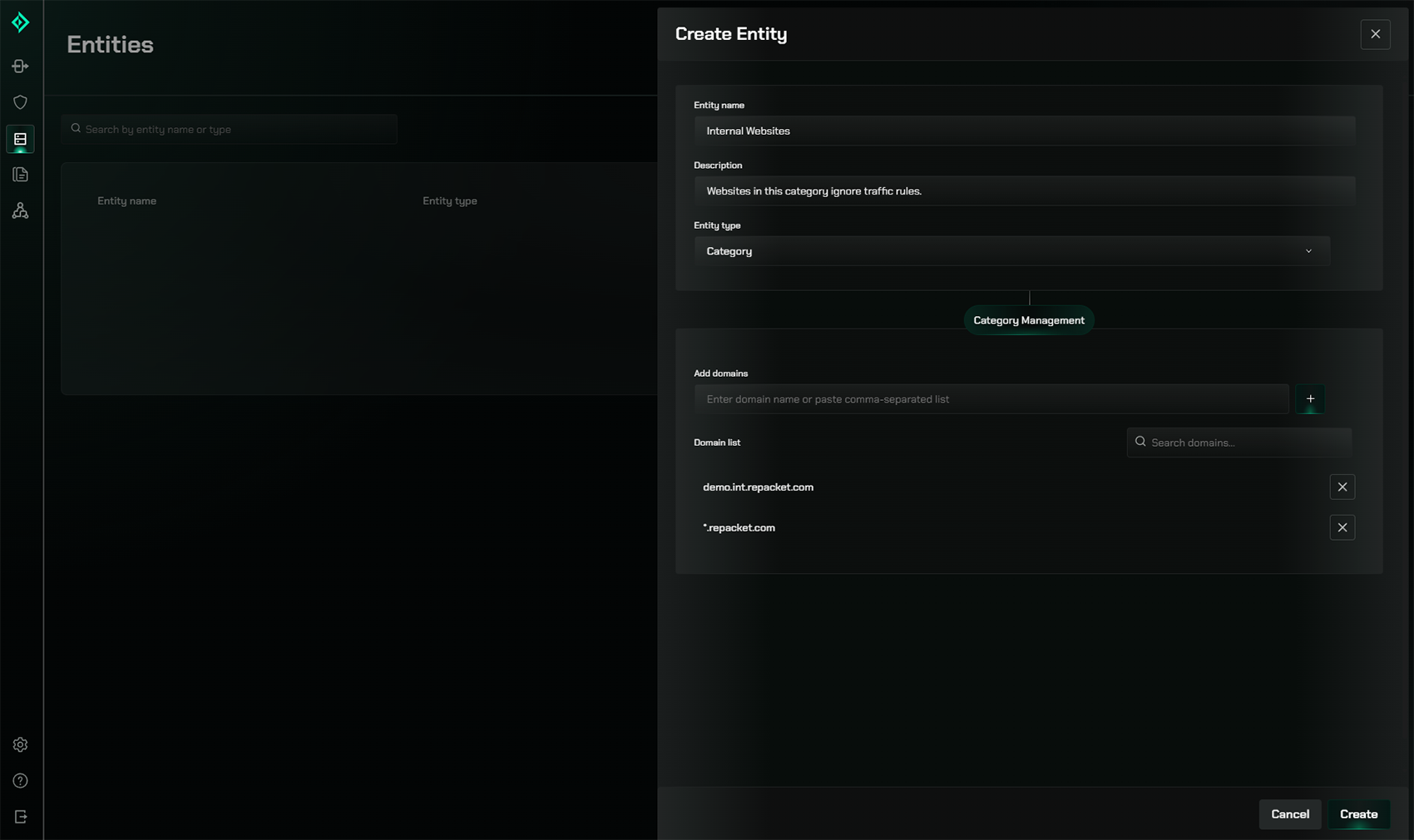 Feel free to read our [Entities documentation](/config/entities) for more info about creating custom entities.