> ## Documentation Index
> Fetch the complete documentation index at: https://docs.repacket.com/llms.txt
> Use this file to discover all available pages before exploring further.
# Bypass
> Exclude specific traffic from Repacket interception entirely
Bypass rules allow you to completely exclude traffic from Repacket's interception, ensuring certain websites or applications operate without any agent involvement.
## Overview
Bypass rules enable you to exclude specific traffic from Repacket's interception entirely. Unlike Firewall Block rules, which still intercept and analyze traffic, Bypass rules tell the Repacket agent to completely ignore matching traffic and let it pass through without any processing.
Traffic matching bypass rules is completely ignored by the Repacket agent
Define bypass rules based on websites, [categories](/config/categories), IP ranges, or domains
Apply bypass rules to specific users, groups, or devices
Enable or disable bypass rules as needed with simple toggles
## How It Works
Bypass rules operate at a lower level than Firewall rules. When traffic matches a bypass rule:
1. **No Interception**: The Repacket agent does not intercept the traffic at all
2. **No Analysis**: No categorization, scanning, or policy evaluation occurs
3. **Direct Connection**: Traffic flows directly to its destination without any Repacket involvement
This is fundamentally different from Firewall Block rules, which still intercept traffic to apply policies, perform categorization, and enable other security features.
### Bypass vs Firewall Block
| Feature | Bypass | Firewall Block |
| ------------------ | ------ | -------------- |
| Agent Interception | None | Yes |
| Traffic Analysis | None | Yes |
| Categorization | None | Yes |
| Policy Evaluation | None | Yes |
## Creating Bypass Rules
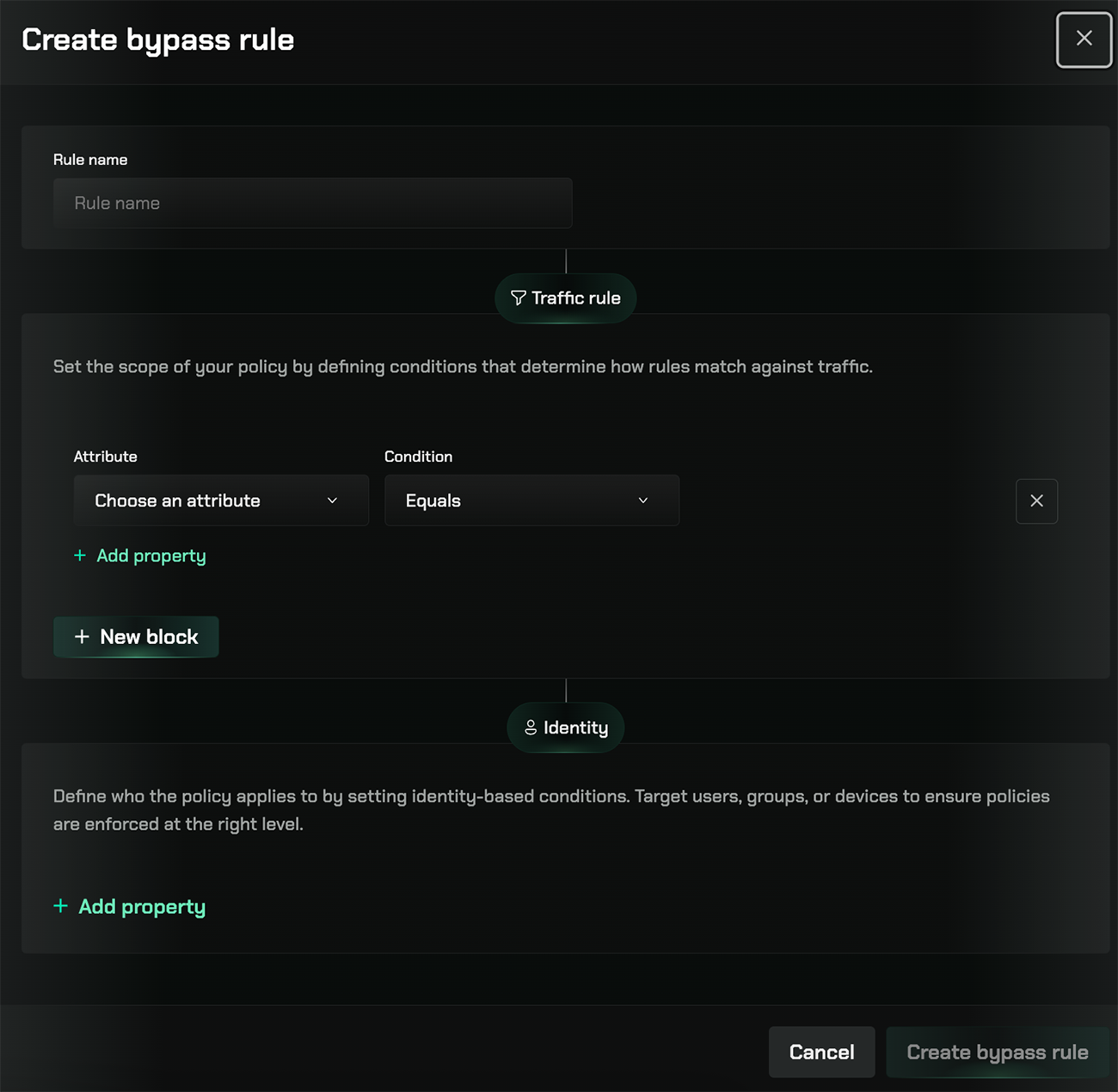 Go to the [Gateway section](https://app.repacket.com/gateway#bypass) in your Repacket dashboard and select the "Bypass" tab.
Click the "+ Create bypass rule" button in the top right corner.
Provide a descriptive name for your bypass rule (e.g., "Bypass AWS", "Bypass Internal Tools").
In the Traffic rule section, set the scope of your policy by defining conditions that determine how rules match against traffic.
Select an attribute from the dropdown:
* **All Websites**: Bypass all web traffic
* **Content Categories**: Bypass specific [categories](/config/categories) of websites
* **IP Range**: Bypass traffic to specific IP address ranges
* **Domain**: Bypass traffic to specific domains
Then select a condition (e.g., "Equals", "Contains", "Matches") and specify the matching criteria.
In the Identity section, define who the policy applies to by setting identity-based conditions.
Click "+ Add property" to target:
* Specific users
* User groups
* Devices
If no identity conditions are specified, the bypass rule applies to all users and devices.
Click "Save" to create the bypass rule. The rule will be enabled by default and immediately take effect.
## Managing Bypass Rules
The Bypass page displays all your bypass rules in a table format with the following information:
* **Name**: The descriptive name you assigned to the rule
* **Last Updated**: Timestamp showing when the rule was last modified
* **Status**: A toggle switch indicating whether the rule is enabled (green) or disabled
### Rule Management Actions
* **Search**: Use the search bar to find rules by name
* **Enable/Disable**: Toggle rules on or off using the status switch
* **Edit**: Click the ellipsis menu (⋮) to access additional options for each rule
* **Pagination**: Navigate through multiple pages of rules if you have many configured
## Traffic Rule Attributes
Bypass rules support several traffic matching attributes:
### All Websites
Bypass all web traffic for the specified identity conditions. Use this sparingly, as it completely disables Repacket for matching users or devices.
### Content Categories
Bypass traffic to specific content [categories](/config/categories) (e.g., Business, Technology, Social Media). Useful for bypassing entire [categories](/config/categories) of websites that need direct access.
### IP Range
Bypass traffic to specific IP address ranges. Ideal for:
* Internal network resources
* Cloud service IP ranges (AWS, Azure, GCP)
* CDN endpoints
* Specific service providers
### Domain
Bypass traffic to specific domains or subdomains. Examples:
* `example.com` - bypasses all subdomains
* `*.example.com` - bypasses all subdomains using wildcard
* `api.example.com` - bypasses only the specific subdomain
## Best Practices
Bypass rules are ideal for applications where even minimal latency from interception could impact performance, such as real-time trading platforms or high-frequency APIs.
Configure bypass rules for internal network resources, intranet sites, and local services that don't require security scanning.
Prefer specific domain or IP range conditions over "All Websites" to maintain security coverage where possible. Only bypass what truly needs to be bypassed.
Use descriptive rule names and consider documenting why each bypass rule exists. This helps with auditing and future maintenance.
Periodically review your bypass rules to ensure they're still necessary. Remove bypass rules for services that no longer require exclusion.
If you need to permit traffic but still want visibility, categorization, and other security features, use a Firewall Block rule instead of a Bypass rule.
## Related Features
Control access with Allow, Block, and Warn rules that still provide visibility
Apply advanced security protections to intercepted traffic
Create temporary exceptions for blocked content
Manage users and groups for identity-based bypass rules
Go to the [Gateway section](https://app.repacket.com/gateway#bypass) in your Repacket dashboard and select the "Bypass" tab.
Click the "+ Create bypass rule" button in the top right corner.
Provide a descriptive name for your bypass rule (e.g., "Bypass AWS", "Bypass Internal Tools").
In the Traffic rule section, set the scope of your policy by defining conditions that determine how rules match against traffic.
Select an attribute from the dropdown:
* **All Websites**: Bypass all web traffic
* **Content Categories**: Bypass specific [categories](/config/categories) of websites
* **IP Range**: Bypass traffic to specific IP address ranges
* **Domain**: Bypass traffic to specific domains
Then select a condition (e.g., "Equals", "Contains", "Matches") and specify the matching criteria.
In the Identity section, define who the policy applies to by setting identity-based conditions.
Click "+ Add property" to target:
* Specific users
* User groups
* Devices
If no identity conditions are specified, the bypass rule applies to all users and devices.
Click "Save" to create the bypass rule. The rule will be enabled by default and immediately take effect.
## Managing Bypass Rules
The Bypass page displays all your bypass rules in a table format with the following information:
* **Name**: The descriptive name you assigned to the rule
* **Last Updated**: Timestamp showing when the rule was last modified
* **Status**: A toggle switch indicating whether the rule is enabled (green) or disabled
### Rule Management Actions
* **Search**: Use the search bar to find rules by name
* **Enable/Disable**: Toggle rules on or off using the status switch
* **Edit**: Click the ellipsis menu (⋮) to access additional options for each rule
* **Pagination**: Navigate through multiple pages of rules if you have many configured
## Traffic Rule Attributes
Bypass rules support several traffic matching attributes:
### All Websites
Bypass all web traffic for the specified identity conditions. Use this sparingly, as it completely disables Repacket for matching users or devices.
### Content Categories
Bypass traffic to specific content [categories](/config/categories) (e.g., Business, Technology, Social Media). Useful for bypassing entire [categories](/config/categories) of websites that need direct access.
### IP Range
Bypass traffic to specific IP address ranges. Ideal for:
* Internal network resources
* Cloud service IP ranges (AWS, Azure, GCP)
* CDN endpoints
* Specific service providers
### Domain
Bypass traffic to specific domains or subdomains. Examples:
* `example.com` - bypasses all subdomains
* `*.example.com` - bypasses all subdomains using wildcard
* `api.example.com` - bypasses only the specific subdomain
## Best Practices
Bypass rules are ideal for applications where even minimal latency from interception could impact performance, such as real-time trading platforms or high-frequency APIs.
Configure bypass rules for internal network resources, intranet sites, and local services that don't require security scanning.
Prefer specific domain or IP range conditions over "All Websites" to maintain security coverage where possible. Only bypass what truly needs to be bypassed.
Use descriptive rule names and consider documenting why each bypass rule exists. This helps with auditing and future maintenance.
Periodically review your bypass rules to ensure they're still necessary. Remove bypass rules for services that no longer require exclusion.
If you need to permit traffic but still want visibility, categorization, and other security features, use a Firewall Block rule instead of a Bypass rule.
## Related Features
Control access with Allow, Block, and Warn rules that still provide visibility
Apply advanced security protections to intercepted traffic
Create temporary exceptions for blocked content
Manage users and groups for identity-based bypass rules