> ## Documentation Index
> Fetch the complete documentation index at: https://docs.repacket.com/llms.txt
> Use this file to discover all available pages before exploring further.
# Testing
> Test DLP filters against uploaded files before enforcing in production
## Overview
The Testing feature allows you to verify whether your DLP rules correctly detect sensitive data before they are enforced in production. Upload files and test them against your configured DLP filters to ensure accurate detection and avoid false positives.
## How It Works
Test DLP matching by selecting a DLP filter and uploading files to see whether they trigger the selected filter. The system processes the files and generates an analytics report showing which files matched and which did not.
 ## Testing DLP Filters
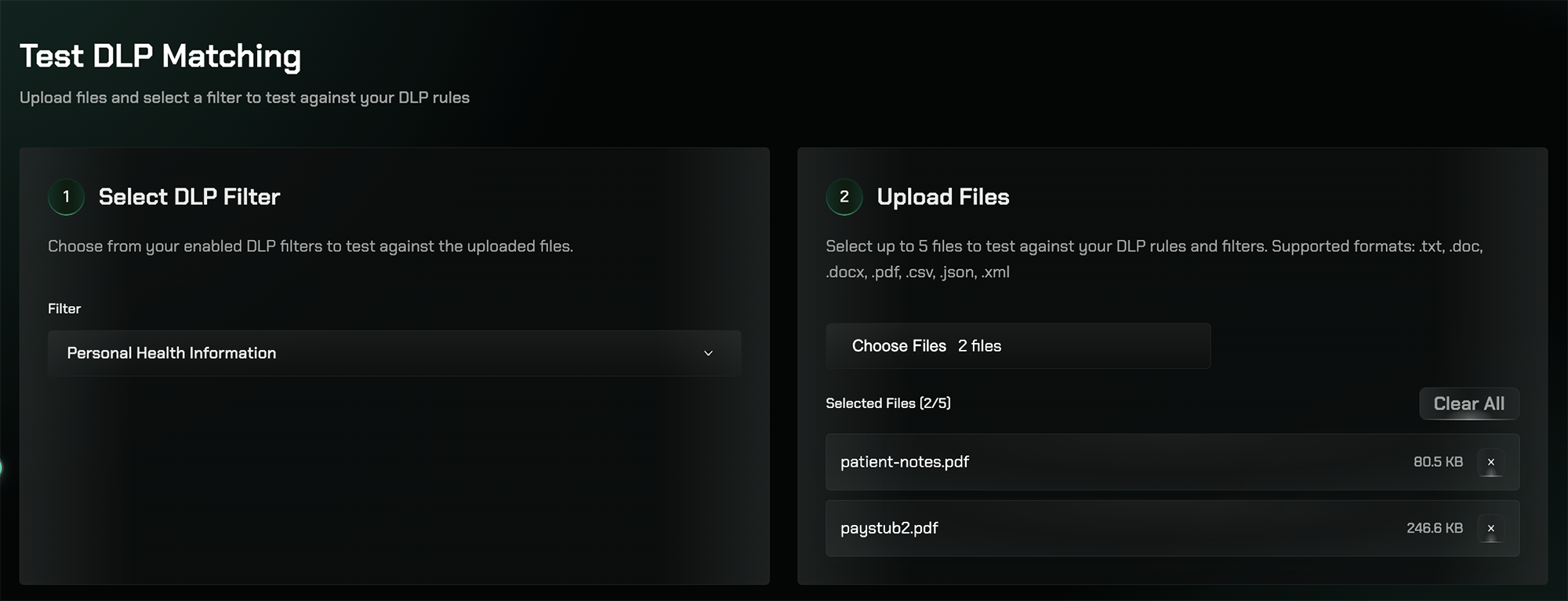
Choose one of your enabled DLP filters to test against uploaded files. For example, select the Personal Health Information (PHI) filter to test detection of patient names, medical record numbers, diagnoses, medications, and other healthcare data.
Upload up to 5 files at once to test against the selected filter. Supported formats include: .txt, .doc, .docx, .pdf, .csv, .json, and .xml.
After processing, the system generates an Analytics Report summarizing the results, showing which files matched the filter and which did not.
## Analytics Report
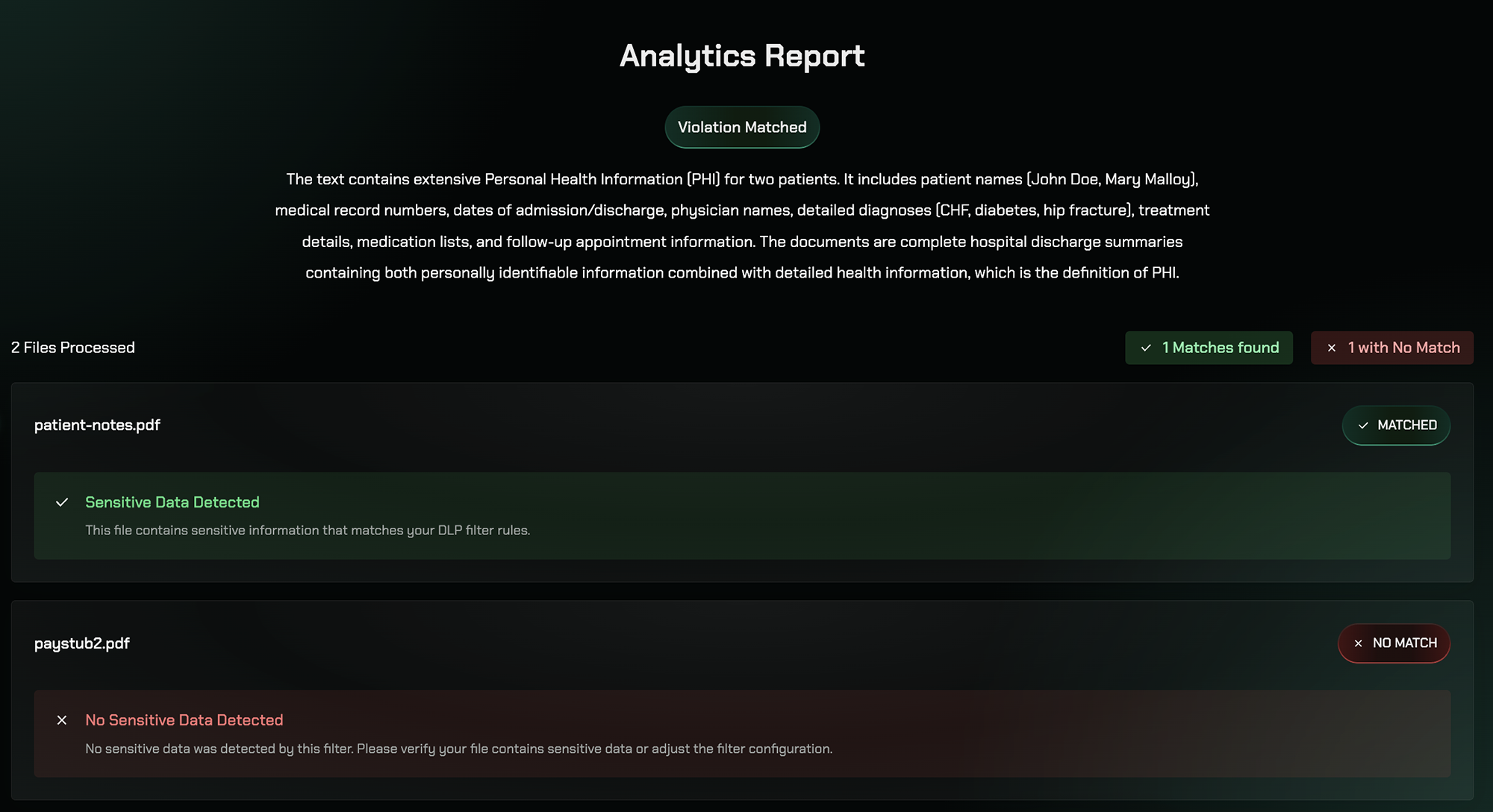
The Analytics Report provides a comprehensive summary of the test results, including overall statistics and file-level breakdowns.
## Testing DLP Filters
Choose one of your enabled DLP filters to test against uploaded files. For example, select the Personal Health Information (PHI) filter to test detection of patient names, medical record numbers, diagnoses, medications, and other healthcare data.
Upload up to 5 files at once to test against the selected filter. Supported formats include: .txt, .doc, .docx, .pdf, .csv, .json, and .xml.
After processing, the system generates an Analytics Report summarizing the results, showing which files matched the filter and which did not.
## Analytics Report
The Analytics Report provides a comprehensive summary of the test results, including overall statistics and file-level breakdowns.
 ### Overall Results
The report shows:
* Total files processed
* Number of matches found
* Number of files with no match
This helps confirm that your DLP filter is working correctly—sensitive documents are flagged while non-relevant files are not falsely detected.
### File-Level Breakdown
Each file in the test receives one of two results:
**✅ Matched** — The file contains sensitive data relevant to the selected filter. The report details what types of sensitive information were detected.
**❌ No Match** — The file does not contain sensitive data relevant to the selected filter. No action is required.
## Key Features
Test up to 5 files simultaneously against your DLP filters
Support for .txt, .doc, .docx, .pdf, .csv, .json, and .xml files
Get comprehensive analytics showing what sensitive data was detected
Verify filter accuracy before enforcing rules in production
## Best Practices
Always test your DLP filters against sample files before enabling them in production to ensure accurate detection.
Test with files that represent the types of content your organization typically handles to validate real-world scenarios.
If a file incorrectly matches, review the detected content to refine your filter configuration.
Test different DLP filters (PHI, PII, PCI, etc.) to ensure each one works as expected for its specific data type.
## Related Features
Configure DLP rules to safeguard sensitive data
Configure AI-powered detection filters for sensitive data
Configure pattern-based detection for sensitive data
### Overall Results
The report shows:
* Total files processed
* Number of matches found
* Number of files with no match
This helps confirm that your DLP filter is working correctly—sensitive documents are flagged while non-relevant files are not falsely detected.
### File-Level Breakdown
Each file in the test receives one of two results:
**✅ Matched** — The file contains sensitive data relevant to the selected filter. The report details what types of sensitive information were detected.
**❌ No Match** — The file does not contain sensitive data relevant to the selected filter. No action is required.
## Key Features
Test up to 5 files simultaneously against your DLP filters
Support for .txt, .doc, .docx, .pdf, .csv, .json, and .xml files
Get comprehensive analytics showing what sensitive data was detected
Verify filter accuracy before enforcing rules in production
## Best Practices
Always test your DLP filters against sample files before enabling them in production to ensure accurate detection.
Test with files that represent the types of content your organization typically handles to validate real-world scenarios.
If a file incorrectly matches, review the detected content to refine your filter configuration.
Test different DLP filters (PHI, PII, PCI, etc.) to ensure each one works as expected for its specific data type.
## Related Features
Configure DLP rules to safeguard sensitive data
Configure AI-powered detection filters for sensitive data
Configure pattern-based detection for sensitive data