> ## Documentation Index
> Fetch the complete documentation index at: https://docs.repacket.com/llms.txt
> Use this file to discover all available pages before exploring further.
# Uploads
> Track and monitor file uploads across your network
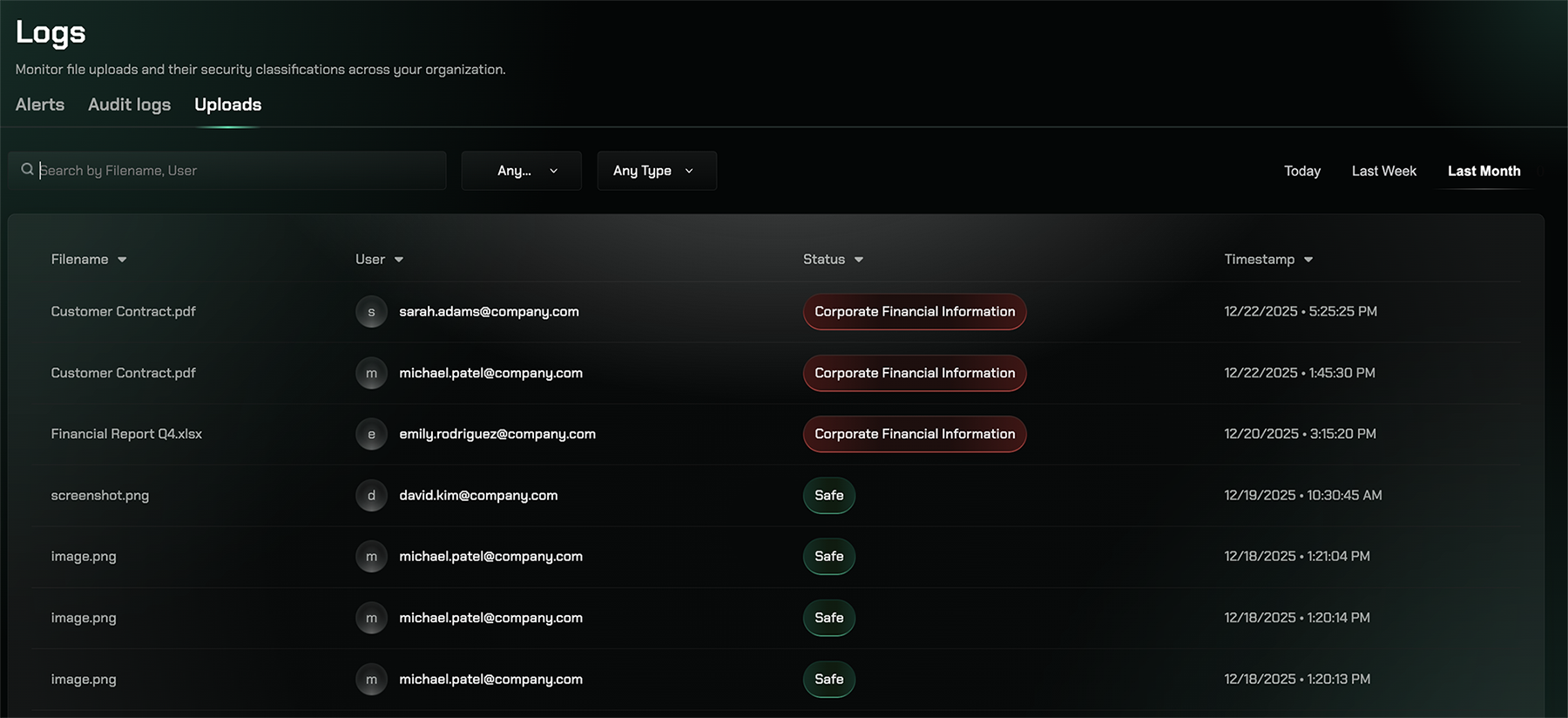
The Uploads section allows you to monitor and track file uploads across your organization's network. Identify potential data exfiltration risks and ensure compliance with data protection policies.
## Overview
The Uploads section allows you to monitor and track file uploads across your organization's network. Identify potential data exfiltration risks and ensure compliance with data protection policies.
 ## Key Features
Track all file uploads in real-time across your network
View file names, sizes, destinations, and upload timestamps
Identify which users uploaded files and to which destinations
See when uploads trigger Data Loss Prevention rules
## Accessing Uploads
Visit the [Uploads page](https://app.repacket.com/logs#uploads) in your Repacket dashboard to monitor file transfers and upload activities.
## Related Features
Get notified when suspicious uploads are detected
Review detailed activity logs for upload investigations
## Key Features
Track all file uploads in real-time across your network
View file names, sizes, destinations, and upload timestamps
Identify which users uploaded files and to which destinations
See when uploads trigger Data Loss Prevention rules
## Accessing Uploads
Visit the [Uploads page](https://app.repacket.com/logs#uploads) in your Repacket dashboard to monitor file transfers and upload activities.
## Related Features
Get notified when suspicious uploads are detected
Review detailed activity logs for upload investigations