> ## Documentation Index
> Fetch the complete documentation index at: https://docs.repacket.com/llms.txt
> Use this file to discover all available pages before exploring further.
# Protections
> Safeguard users with advanced phishing prevention and session protection
Repacket Protections help secure your organization with intelligent controls against phishing attacks and session hijacking attempts.
## Overview
The Protections module provides advanced protection capabilities that you can layer on top of any traffic.
Detect and block sophisticated phishing attempts using AI and known-bad sites
Prevent session hijacking by encrypting cookies for critical applications
## How It Works
The Protections module operates through a unified rule builder that allows administrators to apply specific protection types to defined traffic [categories](/config/categories) or applications.
 ### AI Phishing Scan
You should enable a "Block" rule for the "Phishing" category in your Firewall rules alongside this protection.
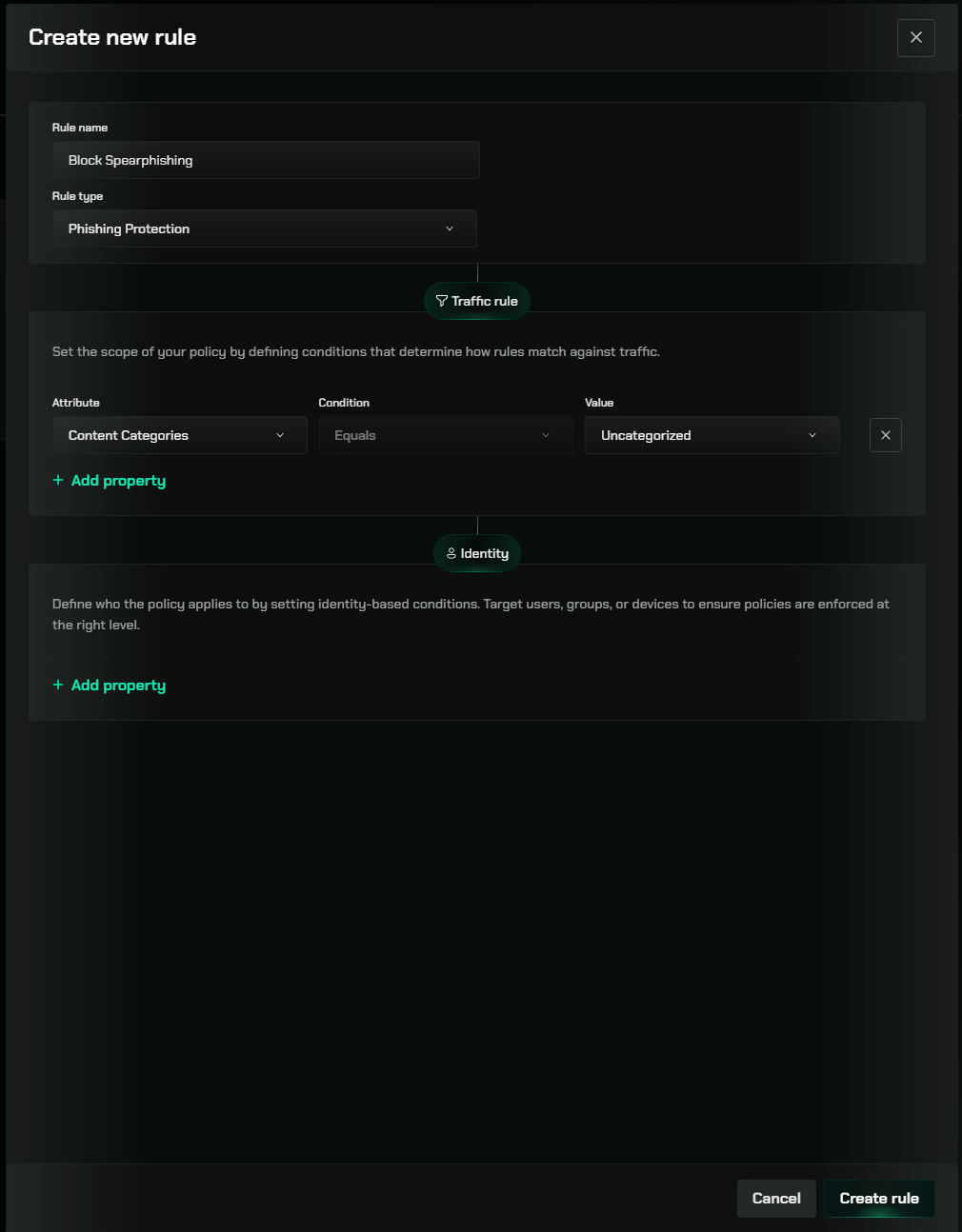
Repacket can be configured to run an "AI Phishing Scan" on webpages - detecting and blocking previously unknown phishing websites, like spearphishing.
We highly recommend applying this to the "Uncategorized" category.
You can read more about this feature on our [AI Phishing Scan documentation](/modules/phishing-prevention).
### Session Protection
Session Protection is a Repacket Protection which allows you to encrypt the session cookies within your browser.
This allows you to prevent malware or XSS attacks from stealing your session cookies for use on other devices -- Repacket cookies can only be used on the device they were created on!
Repacket provides pre-configured session protection for popular services like Google, Okta, GitHub, and others.
This feature can also be used to block cookies, for instance, in the case of ad tracking cookies.
You can read more about this feature on our [Session Protection documentation](/modules/session-protection).
## Creating Protection Rules
Go to the [Protections section](https://app.repacket.com/gateway#protections) in your Repacket dashboard.
Click the "Create new rule" button in the top right corner.
Choose between "Session Protection" or "Phishing Prevention" depending on your needs.
For Session Protection: Select specific applications from the dropdown (Google, Atlassian, etc.)
For Phishing Prevention: Choose [categories](/config/categories) or domains to apply the protection to
Define which users or groups the rule should apply to or exclude.
For Session Protection: Choose which cookies to encrypt (all, HttpOnly, or custom patterns)
For Phishing Prevention: Configure AI sensitivity and warning behavior
Apply your changes to enforce the new protection rule across your network.
## Best Practices
Begin by applying session protection to your identity providers (Okta, Google Workspace) and critical business applications.
For phishing prevention, consider using "Warn" mode instead of "Block" to reduce false positives while still alerting users.
When creating custom session protection rules, test thoroughly to ensure application functionality isn't affected.
Complement technical controls with user education about phishing warning messages and how to report false positives.
## Related Features
Control internet access with granular access rules
Exclude specific traffic from Repacket interception entirely
Allow temporary access to blocked categories when needed
Detect and block sophisticated phishing attempts using AI and known-bad sites
Prevent session hijacking by encrypting cookies for critical applications
### AI Phishing Scan
You should enable a "Block" rule for the "Phishing" category in your Firewall rules alongside this protection.
Repacket can be configured to run an "AI Phishing Scan" on webpages - detecting and blocking previously unknown phishing websites, like spearphishing.
We highly recommend applying this to the "Uncategorized" category.
You can read more about this feature on our [AI Phishing Scan documentation](/modules/phishing-prevention).
### Session Protection
Session Protection is a Repacket Protection which allows you to encrypt the session cookies within your browser.
This allows you to prevent malware or XSS attacks from stealing your session cookies for use on other devices -- Repacket cookies can only be used on the device they were created on!
Repacket provides pre-configured session protection for popular services like Google, Okta, GitHub, and others.
This feature can also be used to block cookies, for instance, in the case of ad tracking cookies.
You can read more about this feature on our [Session Protection documentation](/modules/session-protection).
## Creating Protection Rules
Go to the [Protections section](https://app.repacket.com/gateway#protections) in your Repacket dashboard.
Click the "Create new rule" button in the top right corner.
Choose between "Session Protection" or "Phishing Prevention" depending on your needs.
For Session Protection: Select specific applications from the dropdown (Google, Atlassian, etc.)
For Phishing Prevention: Choose [categories](/config/categories) or domains to apply the protection to
Define which users or groups the rule should apply to or exclude.
For Session Protection: Choose which cookies to encrypt (all, HttpOnly, or custom patterns)
For Phishing Prevention: Configure AI sensitivity and warning behavior
Apply your changes to enforce the new protection rule across your network.
## Best Practices
Begin by applying session protection to your identity providers (Okta, Google Workspace) and critical business applications.
For phishing prevention, consider using "Warn" mode instead of "Block" to reduce false positives while still alerting users.
When creating custom session protection rules, test thoroughly to ensure application functionality isn't affected.
Complement technical controls with user education about phishing warning messages and how to report false positives.
## Related Features
Control internet access with granular access rules
Exclude specific traffic from Repacket interception entirely
Allow temporary access to blocked categories when needed
Detect and block sophisticated phishing attempts using AI and known-bad sites
Prevent session hijacking by encrypting cookies for critical applications